

Enterprise AI Assistant
Nova — Human-AI Interaction
Employees in complex organizations often navigate multiple internal systems to access operational information and complete routine tasks. This enterprise AI assistant unifies voice, chat, and document workflows into a single interface with role-aware access to internal data.
My Role: Lead Human-AI Interaction Designer | AX Design | Role-Aware AI Systems | Enterprise 0→1 | Prototyping
Role-Aware Access
Introduced role-based AI behavior to ensure users only see information aligned with their responsibilities.
Multi-Modal Interaction
Designed voice, voice-to-text, and chat workflows to support both hands-busy and precision-driven tasks.
Scalable Navigation
Explored side and bottom navigation models to support both exploratory conversations and repeatable workflows.
Unified Assistant
Integrated conversation, document access, and navigation into a single assistant interface for enterprise environments.
Project Overview
Enterprise AI Assistant is a conceptual, design-led exploration of an internal AI assistant for operational, regulated enterprise environments.
The project investigates how voice- and chat-based interactions could support employees in accessing sensitive corporate and operational information within complex, role-based systems.
The work was informed by common challenges found in large organizations, including fragmented internal tools, permission-based data access, and hands-busy or time-constrained workflows. Rather than focusing on a single function, the project explores how an AI assistant could adapt to different employee roles by aligning AI behavior, feature visibility, and access boundaries with user context.
The goal of this exploration was to define realistic interaction patterns and system structures that could scale beyond a simple chatbot.
The concept examines how conversational AI can coexist with clear navigation, confirmation states, and role-aware permissions to create an experience that feels trustworthy, predictable, and appropriate for use in regulated environments.
This case study represents a UX and systems-thinking exercise, not a shipped product, and is intentionally abstracted to remain independent of any specific company, platform, or dataset.
My Role
I served as the Lead Human-AI Interaction Designer, responsible for:
- Product design and UX strategy
- Voice and chat interaction design
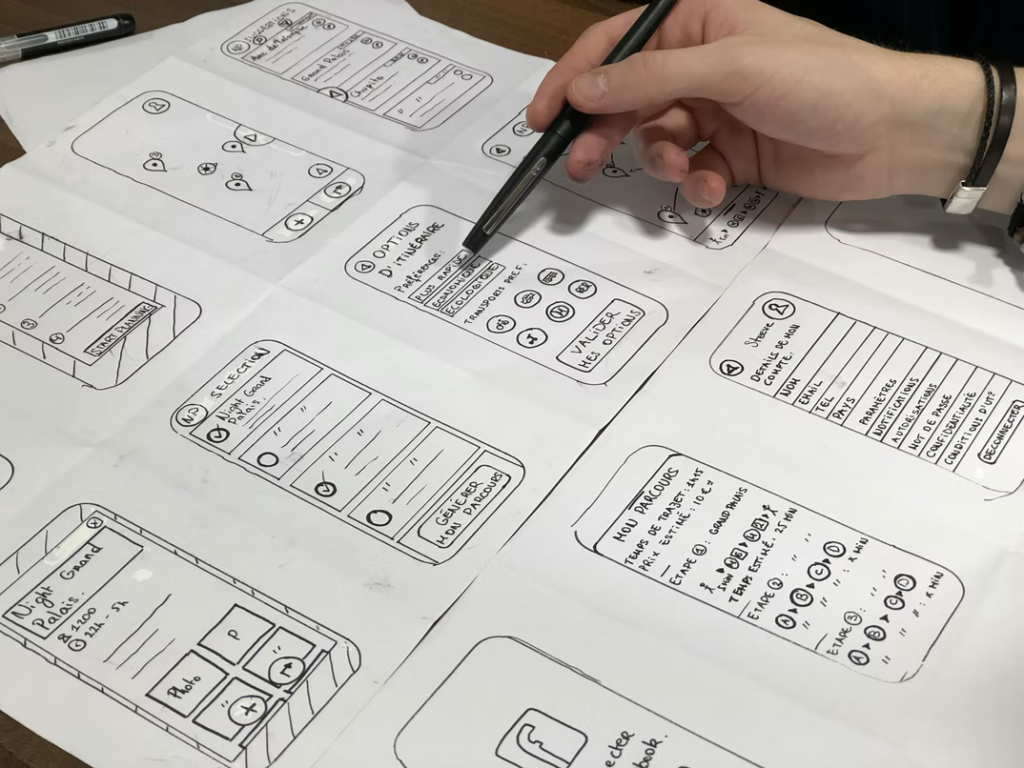
- Information architecture and navigation exploration
- Role-based access and permission concepts
- Early design system considerations for AI-driven interfaces
- Human-AI trust pattern design: confirmation states, permission visibility, error handling
- Interaction model research for multi-modal AI inputs (voice, voice-to-text, chat)
The work was completed independently as a professional exploration of enterprise AI assistant design, with a focus on usability, safety, and scalability

WHY
The Problem
As organizations begin exploring AI for internal use, the first challenge is rarely technical. The real risk lies in introducing an assistant that surfaces sensitive information without clear boundaries, context, or accountability.
In regulated enterprise environments, employees operate under strict permission models. Different roles have access to different data, actions, and decision-making authority. A generic AI assistant that treats all users the same can quickly become unsafe, exposing information to the wrong audience or creating uncertainty about what can be trusted.

Another challenge is trust. When AI is introduced for the first time inside an organization, employees are naturally cautious. If responses feel inconsistent, overly confident, or disconnected from known systems, adoption stalls. In high-risk environments, users need clarity: Where is this information coming from? Is this response complete or partial? Can I act on this safely?
Early AI concepts often focus on conversation alone, assuming that natural language is enough. In reality, conversational interfaces without structure can increase cognitive load, especially when users need to repeat tasks, review sensitive information, or confirm actions. Without visible guardrails, AI becomes harder to trust, not easier to use.
The core problem this project addresses is not how to add AI to an organization, but how to introduce AI responsibly. The challenge is designing an assistant that feels helpful without overstepping, flexible without being ambiguous, and powerful without undermining existing controls.
This case study explores how role awareness, explicit permissions, confirmation patterns, and clear navigation can help an enterprise AI assistant earn trust from its first interaction, especially in environments where accuracy, safety, and accountability matter more than speed or novelty.
WHAT
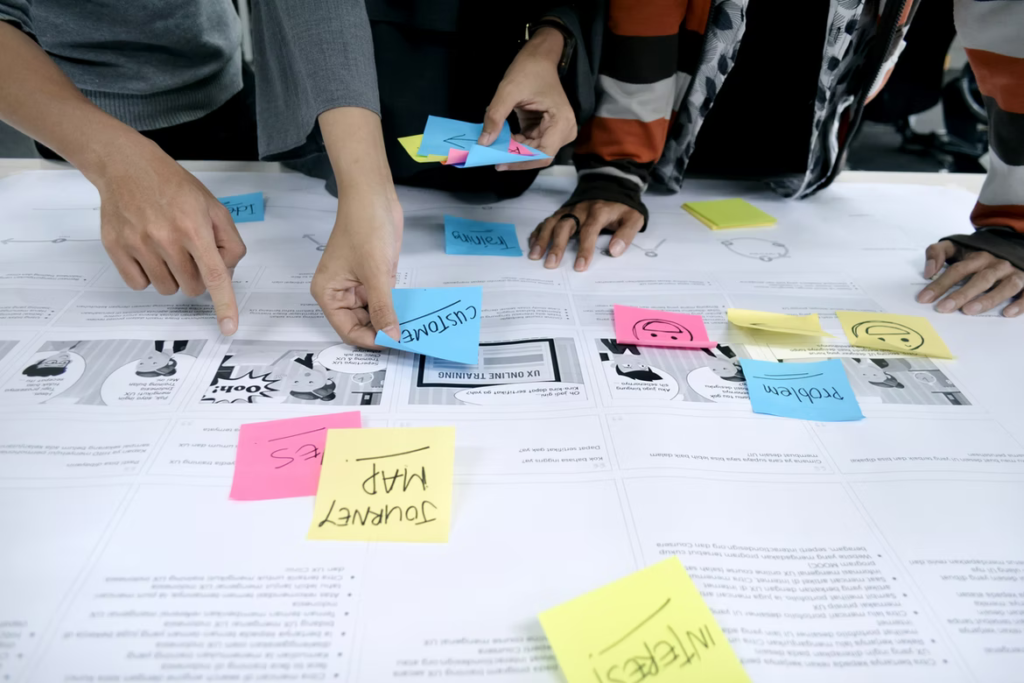
Research & Insights
Because this project explored a first-generation AI assistant, the research phase focused on understanding system constraints, role differentiation, and interaction risks rather than validating a finished product. Insights were drawn from early technical conversations, domain knowledge of enterprise platforms, and analysis of common failure patterns in internal tools.
1. Not All Users Are Equal
Mental Model Differentiation
A core insight was that internal users do not share the same goals, permissions, or mental models. Field users, operational staff, and administrative roles interact with company data in fundamentally different ways. Treating all users as a single audience increases the risk of confusion, overexposure of sensitive information, and loss of trust.
Implication:
The AI assistant needed to be role-aware from the first interaction, with permissions shaping both what information could be accessed and how it was presented.
2. Permissions Must Be Visible, Not Implied
AI Transparency & Explainability
In many internal systems, access control exists in the backend but is invisible to users. When AI enters the experience, this invisibility becomes a problem. Users need to understand why they can or cannot see certain information, especially when responses vary.
Implication:
AI responses and available actions should reflect role boundaries clearly, reinforcing trust and preventing users from questioning the system’s reliability.
3. Conversation Alone Does Not Scale
Cognitive Load & Conversational UI Limits
While natural language interaction lowers the barrier to entry, it becomes inefficient for repeatable tasks, reviewing information, or switching between functions. Purely conversational interfaces increase cognitive load when users need structure, history, or predictable navigation.
Implication:
The assistant required a balance between conversational flexibility and structured navigation to support both exploratory and routine workflows.
4. Trust Is Built Through Guardrails
Trust-Centered Design
In early AI adoption, users are more sensitive to errors than to speed. Overconfident responses, missing confirmations, or unclear data sources can quickly undermine confidence in the system.
Implication:
Design patterns such as confirmation steps, conversational error handling, and user review were essential to positioning the AI as a supportive assistant rather than an authoritative source.

5. Voice Changes Interaction Expectations
Multimodal Interaction Design
Supporting voice input reshaped how information needed to be structured. Spoken responses had to be concise, interruptible, and easy to confirm visually. Long, dense outputs that work in text quickly break down in voice-first scenarios.
Implication:
Designing for voice improved clarity across the entire experience, including text-based interactions.
Key Takeaway
The research phase revealed that a successful enterprise AI assistant is less about intelligence and more about context, boundaries, and clarity. Role awareness, visible permissions, and structured interaction patterns emerged as foundational requirements, not enhancements.
HOW
The Solution
The design challenge wasn’t just building an assistant. It was answering the question: How does a user know what Nova knows, what it can’t see, and when to trust its output? Every interaction pattern, navigation decision, and confirmation state was designed to answer that question before the user had to ask it.
The solution centered on designing an enterprise AI assistant that could feel conversational without becoming ambiguous and flexible without sacrificing control. Rather than approaching Nova as a standalone chatbot, the experience was intentionally designed as a role-aware system, one that integrates voice, text, navigation, and confirmation patterns into a cohesive, predictable workflow.
From the outset, the assistant’s behavior was shaped by authenticated user context. Available actions and visible features adapt based on role, ensuring that users interact only with information appropriate to their responsibilities. This approach reduces ambiguity and supports safe, predictable access to internal information without requiring users to understand underlying system complexity.
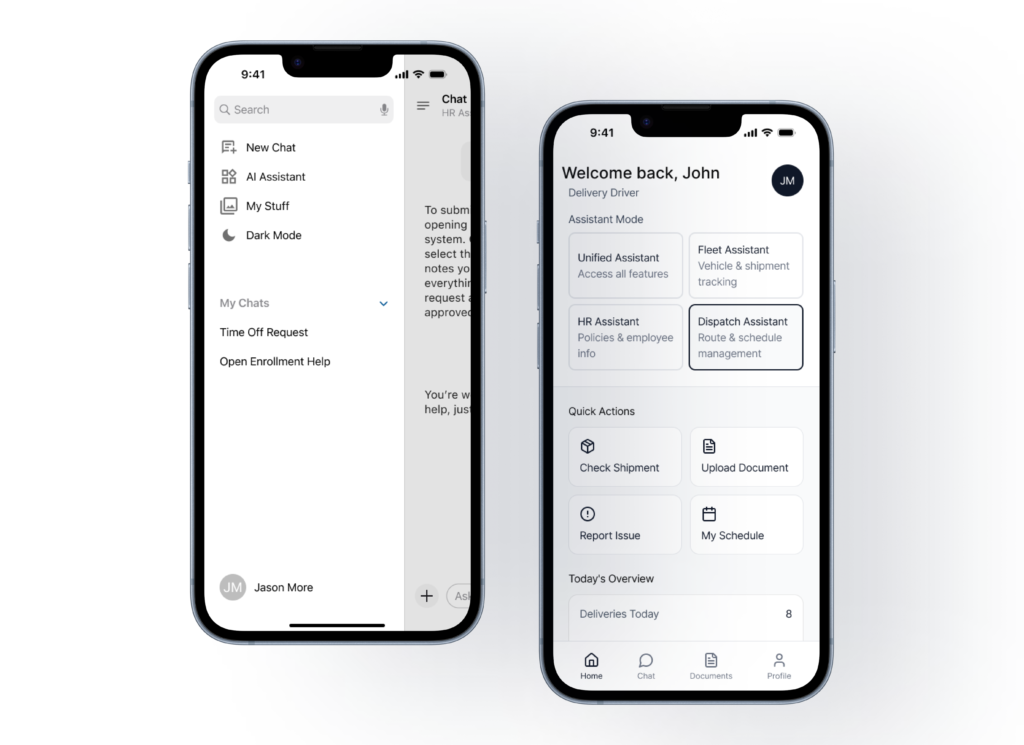
Sidebar Nav Version
Bottom Nav Version
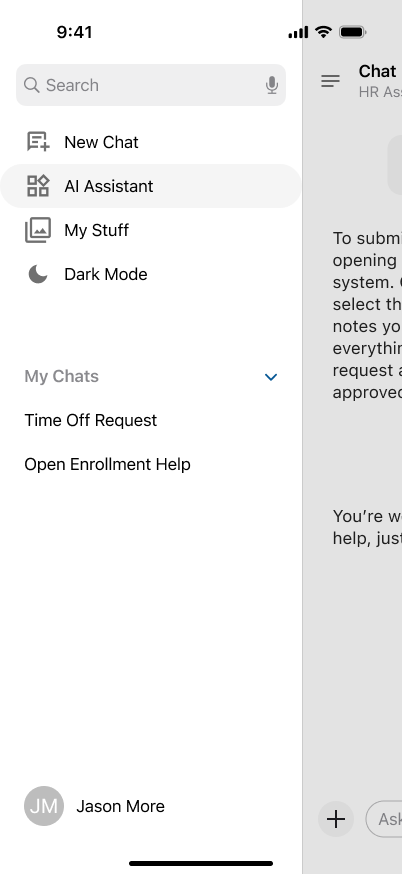
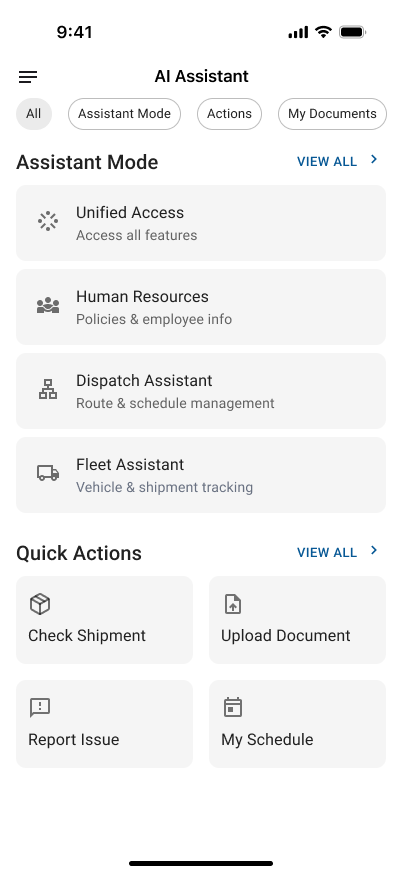
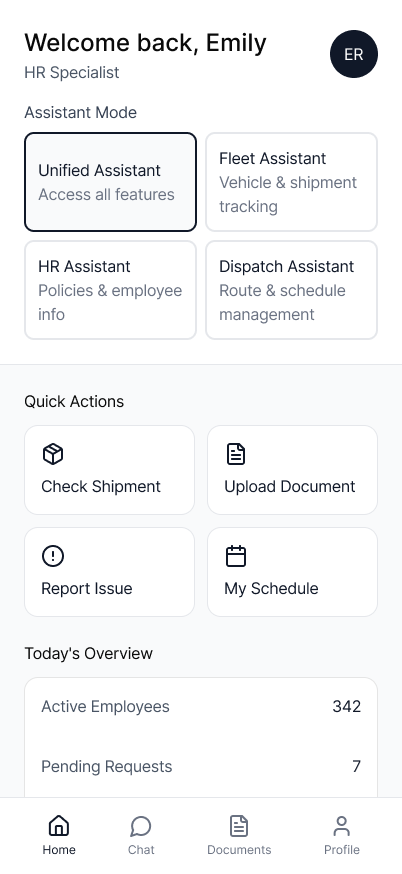
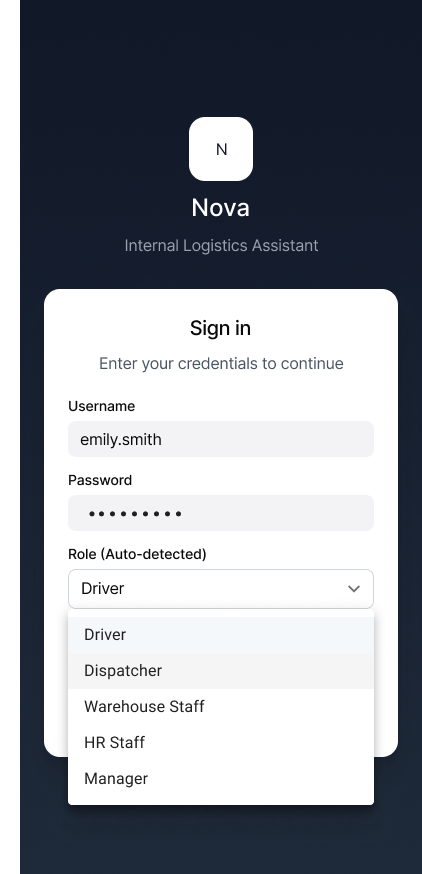
Role-specific entry or assistant home screen showing differentiated options
1. Voice and Chat Interaction Model
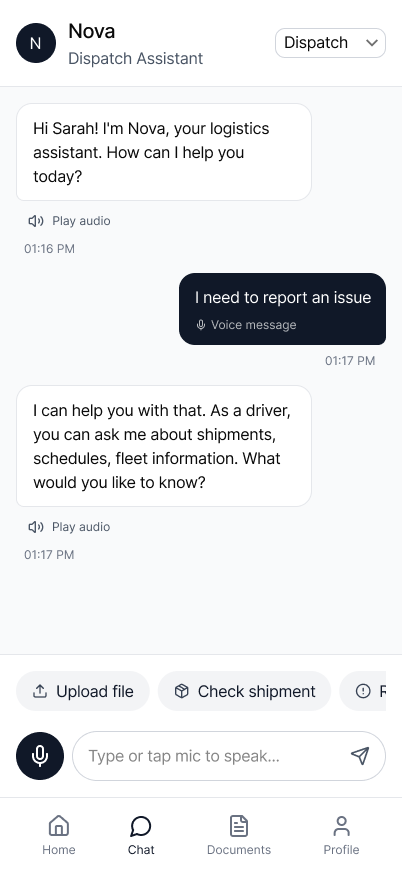
Nova supports three interaction modes: live voice, voice-to-text, and chat, allowing users to choose the most appropriate input method based on environment, task complexity, and confidence level.
Live Voice
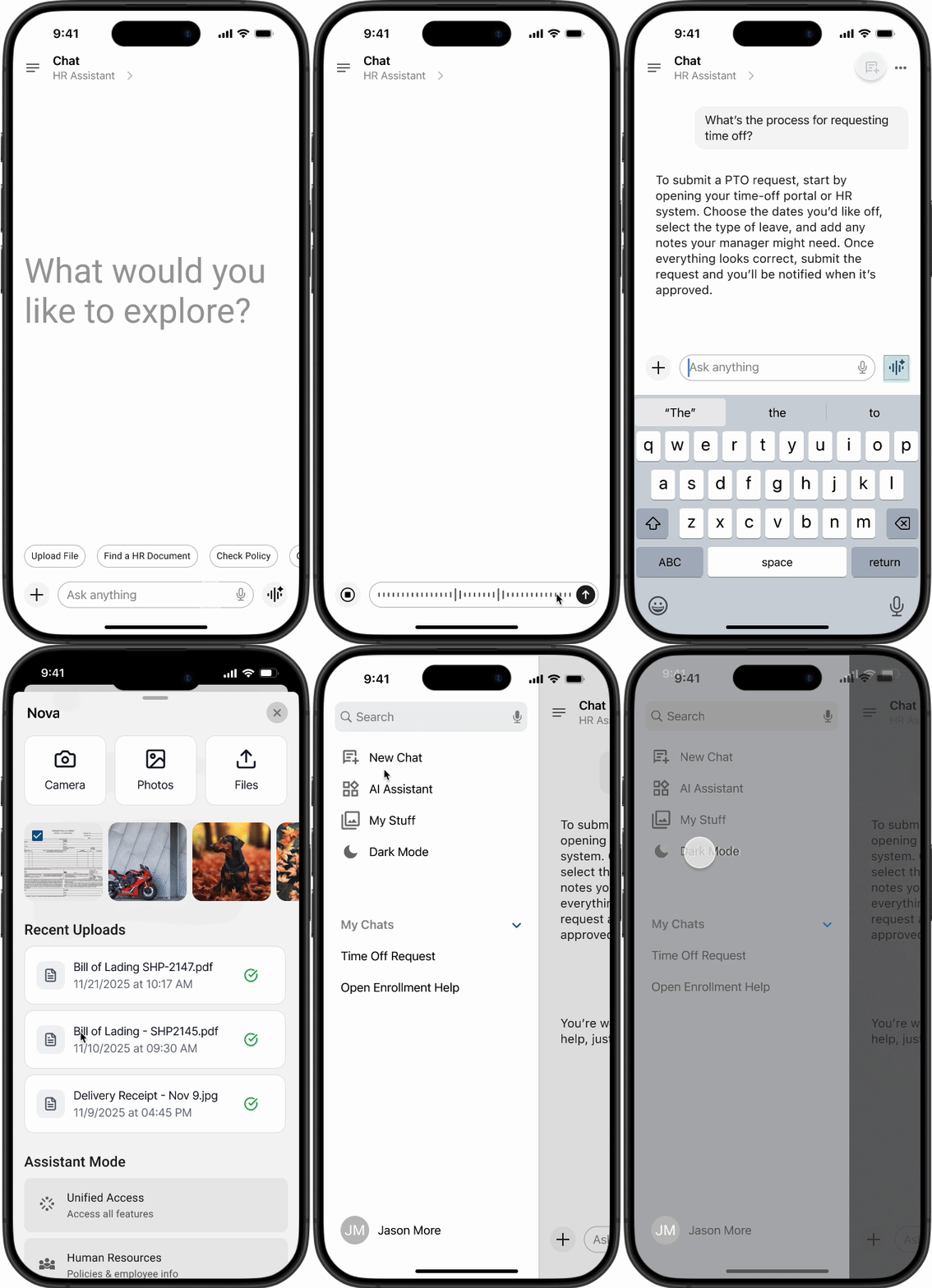
Live voice interaction was designed for speed and hands-busy situations. A single tap initiates listening, with clear visual feedback indicating when the assistant is actively capturing speech.
Voice input stops automatically when the user finishes speaking, and AI responses can be interrupted at any time. Spoken responses remain optional, allowing users to control when audio playback is appropriate.
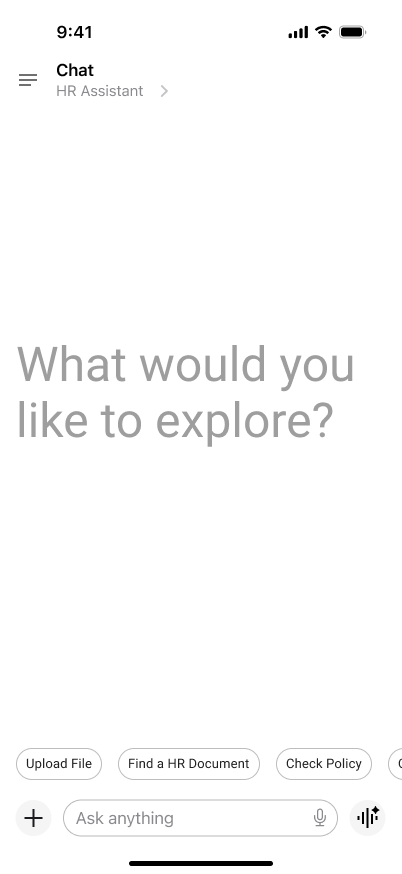



Role-specific entry or assistant home screen showing differentiated options
Voice-to-Text
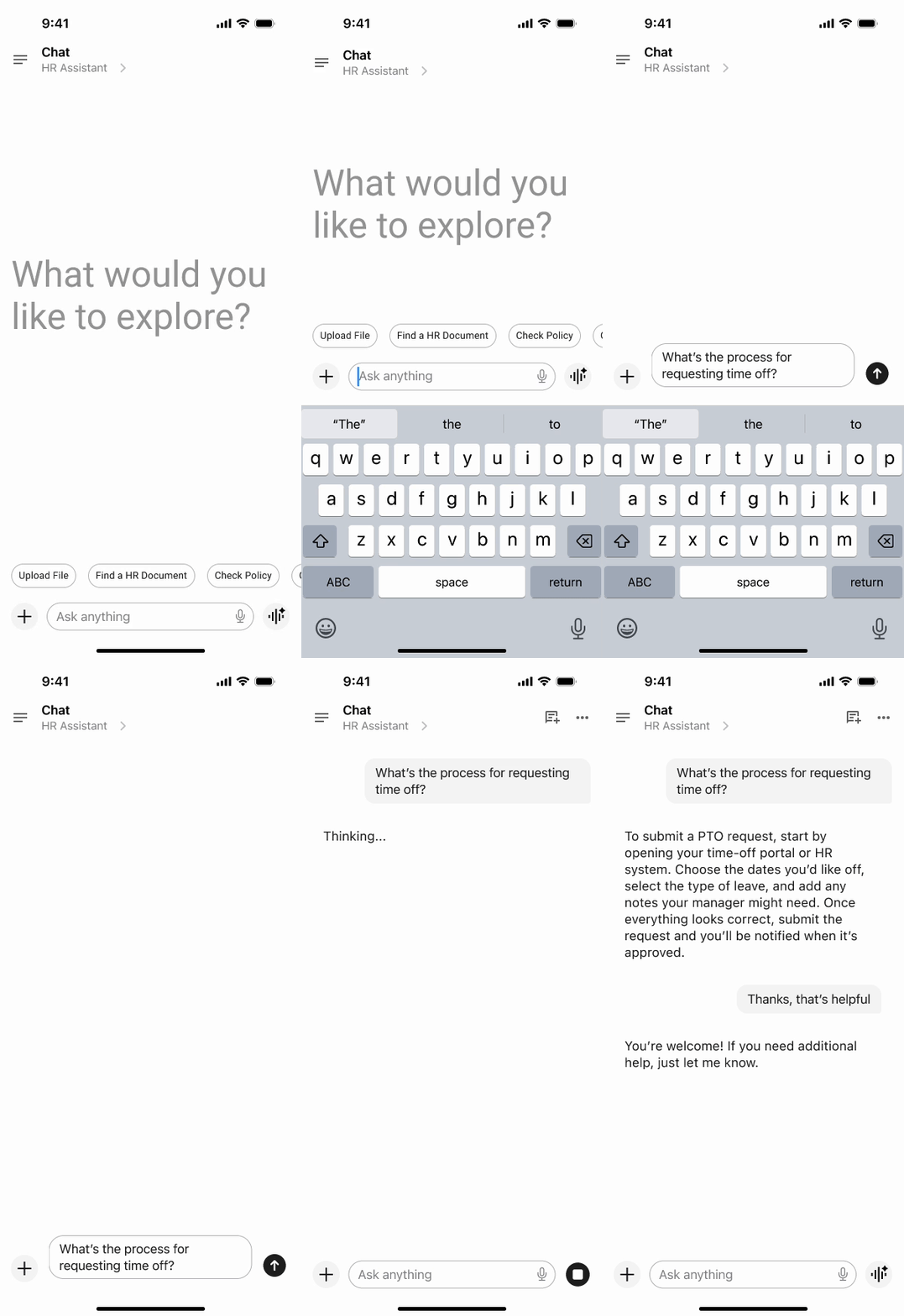
Voice-to-text provides a bridge between speech and precision. Spoken input is converted into editable text before submission, giving users the opportunity to review, correct, or refine their request.
This mode was particularly important for interactions involving sensitive or operational information, where accuracy matters more than speed.

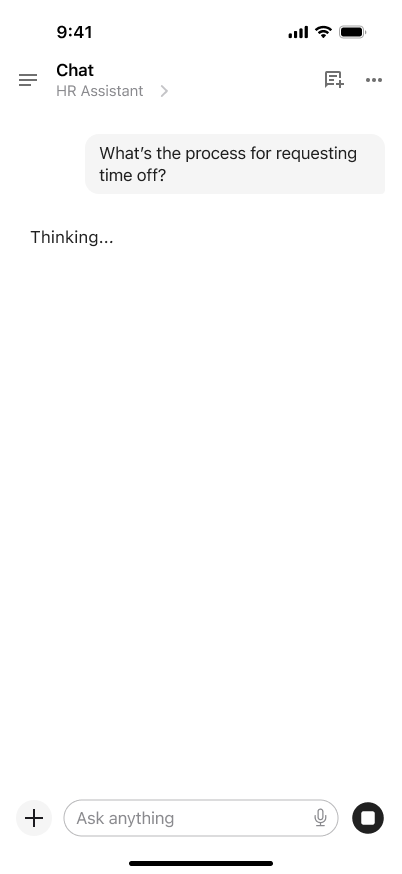
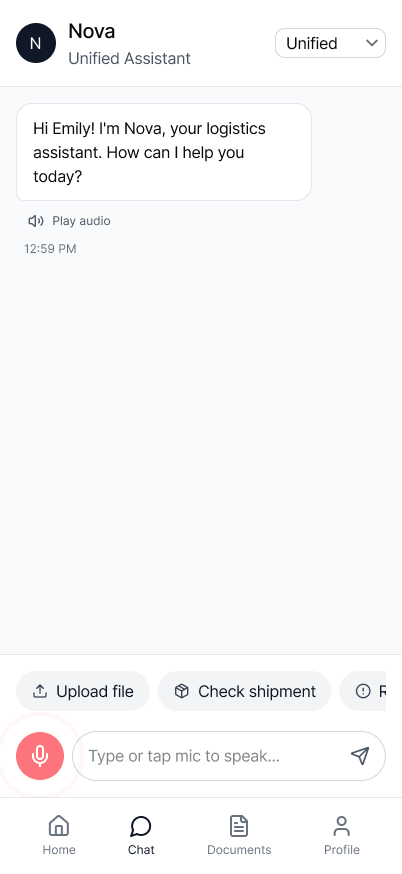
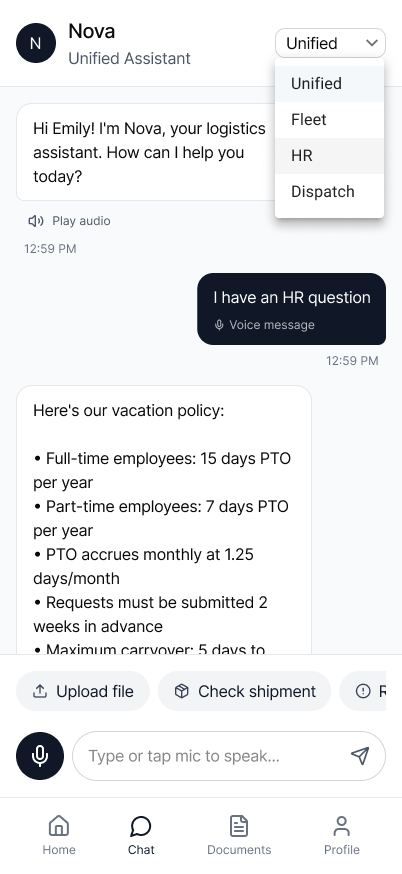
Voice-to-text capture screen with editable input state
Chat
Chat remains the most structured interaction mode. It supports persistent history, repeatable workflows, and clearer scanning of responses.
Rather than long conversational paragraphs, responses are intentionally concise and structured, helping users quickly validate information and move forward with confidence.
2. Navigation & Information Architecture
As the assistant expanded beyond conversation into supporting additional tasks such as document uploads and profile access, navigation emerged as an important design consideration. A purely conversational interface proved limiting once users needed predictable access to repeatable actions.
The evolution between navigation models reflects a broader insight: as AI experiences grow beyond simple conversation, structural navigation becomes essential to support usability at scale.
Two navigation models were explored.
Side Navigation
The first version used a side navigation model, keeping the assistant as the dominant surface while allowing secondary tools to remain accessible but unobtrusive. This approach worked well for exploratory use and early interaction, reinforcing the assistant-first mindset.
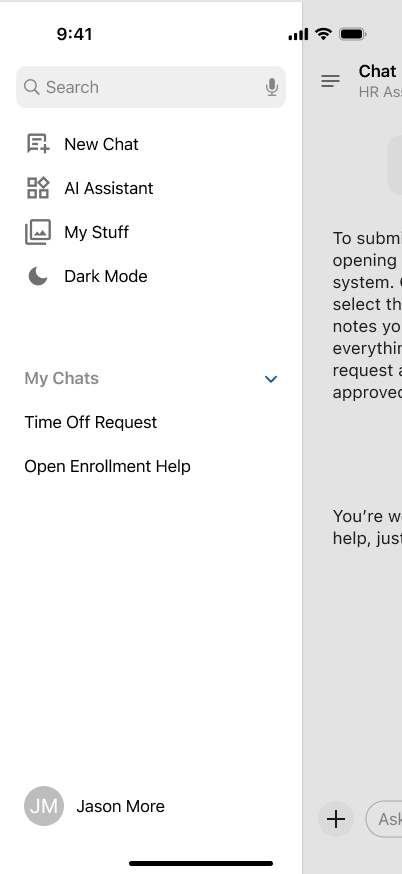
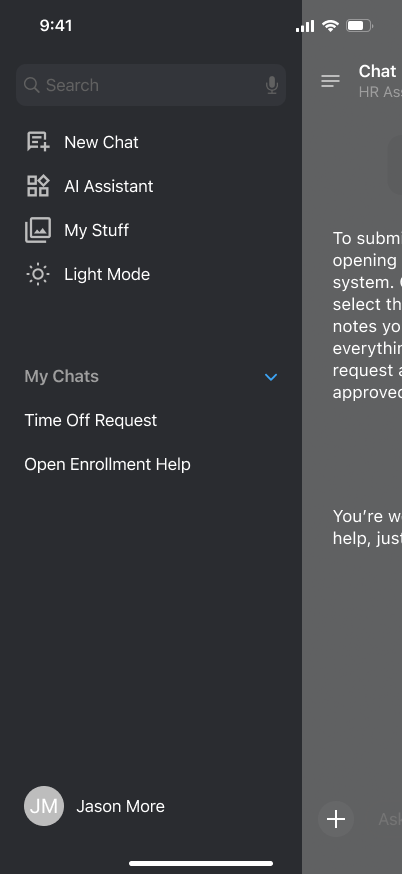
Mobile screen with side navigation open, chat as primary focus
Bottom Navigation
As the experience matured, a second version introduced bottom navigation to support faster access to core functions such as home, chat, documents, and profile. This model improved one-handed usability on mobile and reduced cognitive load for users performing routine tasks, while still preserving conversational continuity.
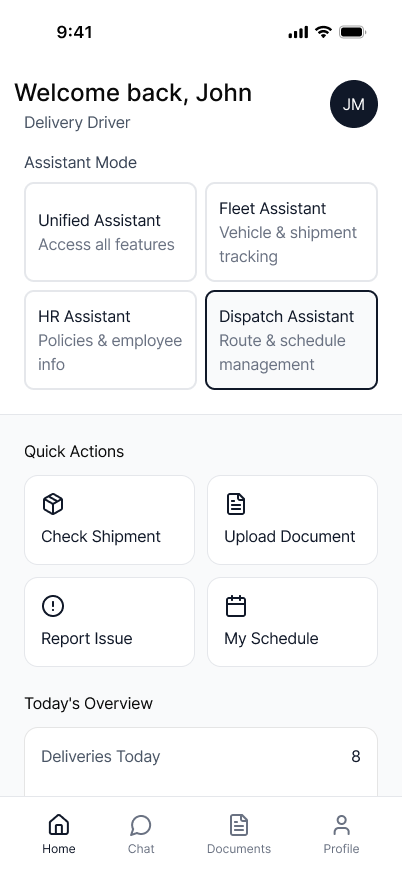
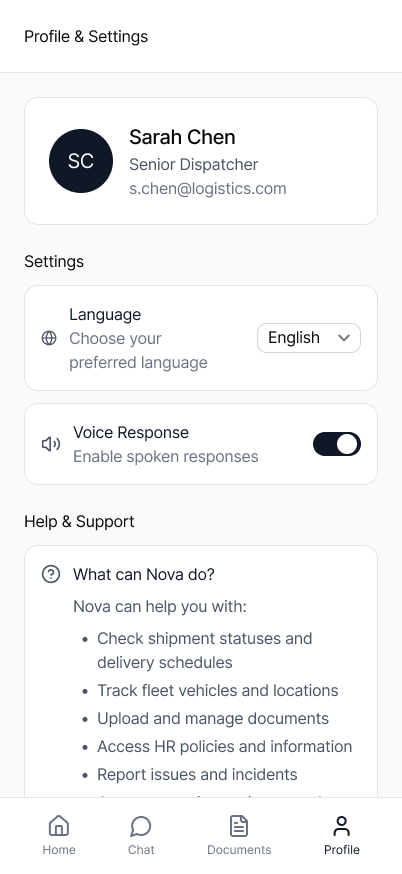
Bottom navigation overview with chat persistence across tabs
3. Document Handling
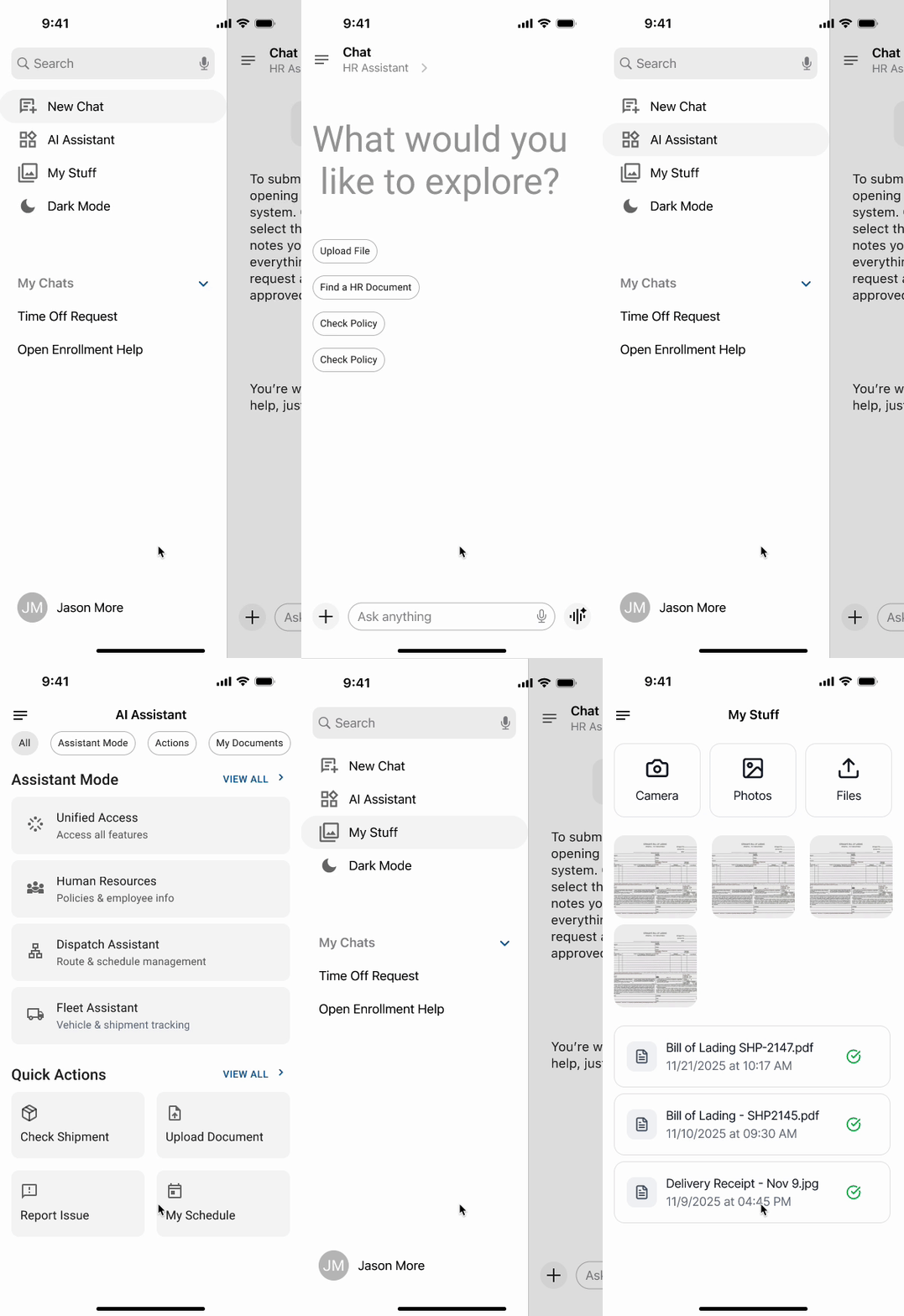
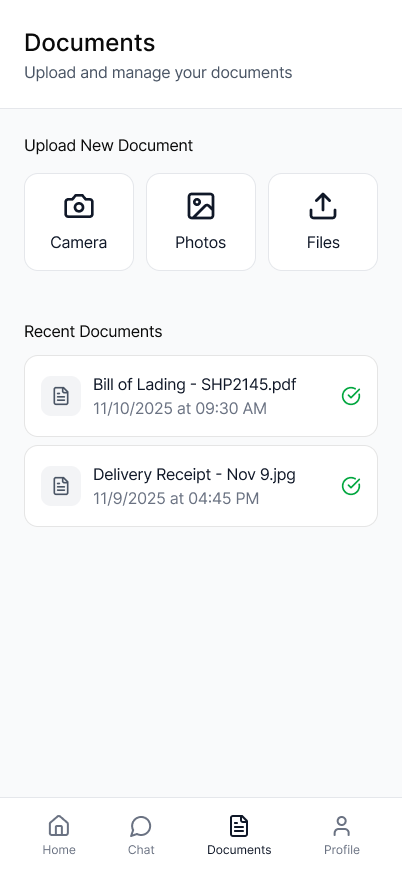
Document handling was designed to integrate seamlessly into the assistant experience. Users can access document-related actions through a dedicated documents area, where they can upload files, capture content using the camera, or select photos from their device.
The document experience was intentionally designed to remain consistent across navigation models, ensuring that upload, camera, and photo flows behave predictably whether accessed through side navigation or bottom navigation. This consistency reduces relearning and supports scalable interaction patterns as the system evolves.
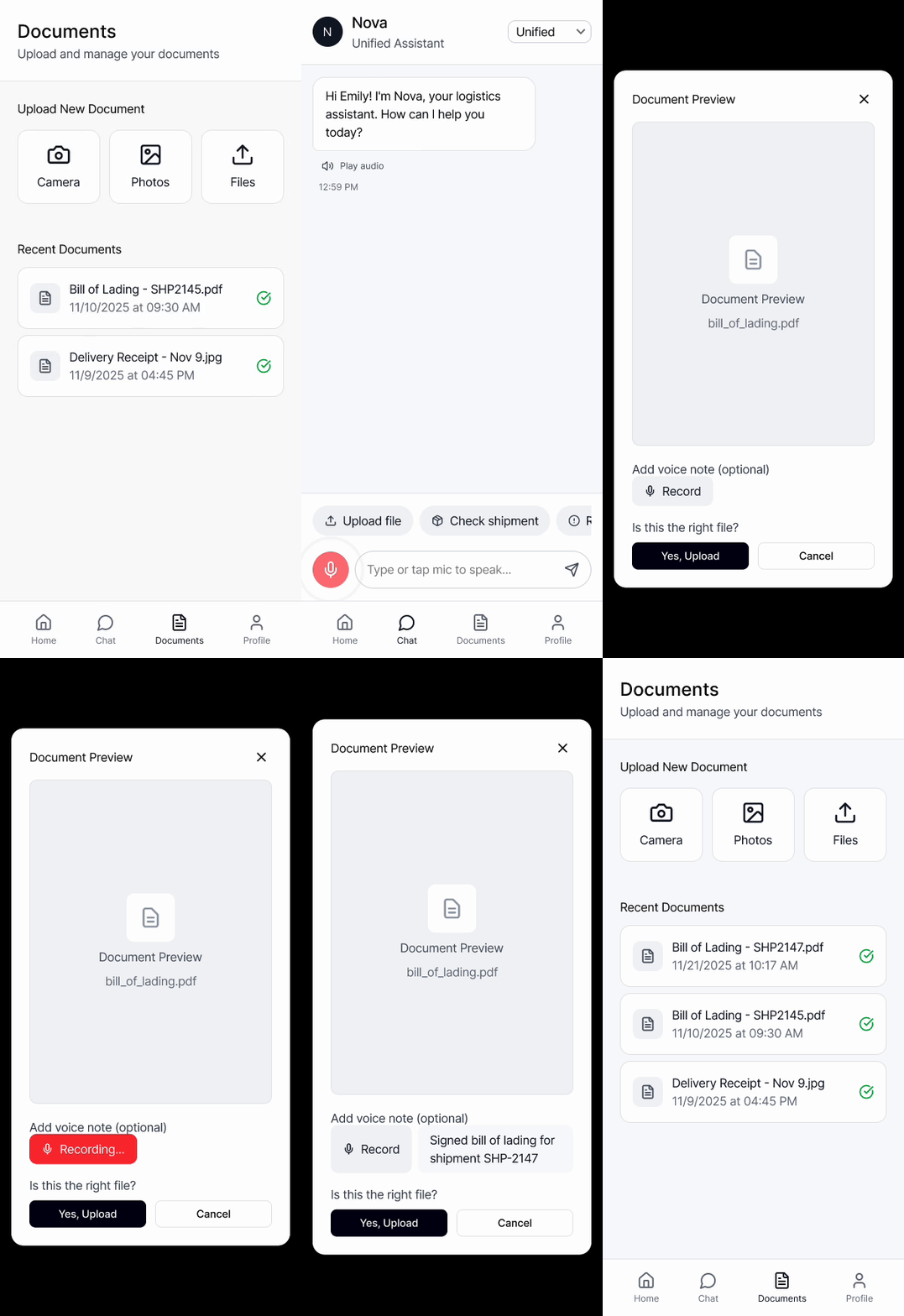
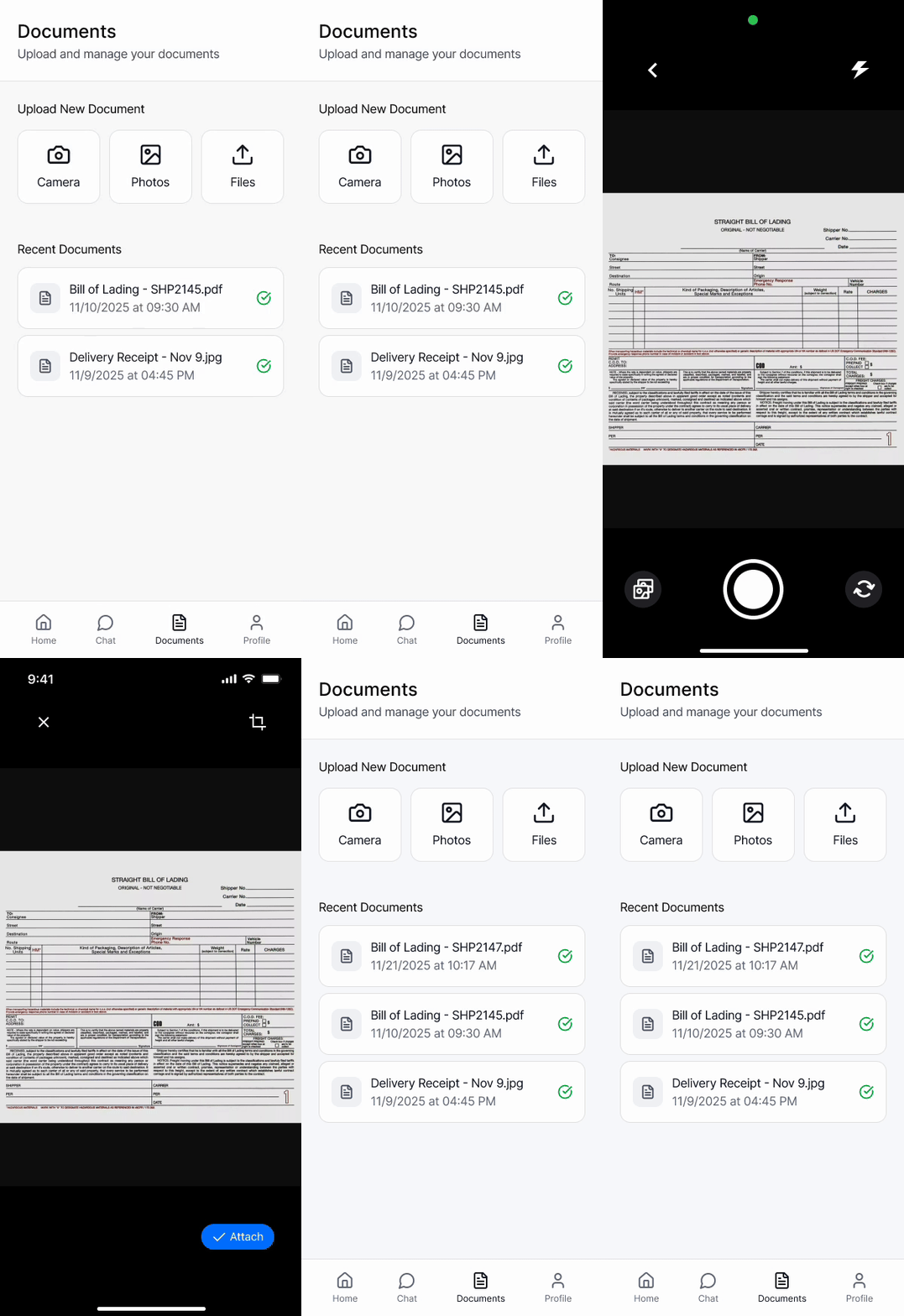
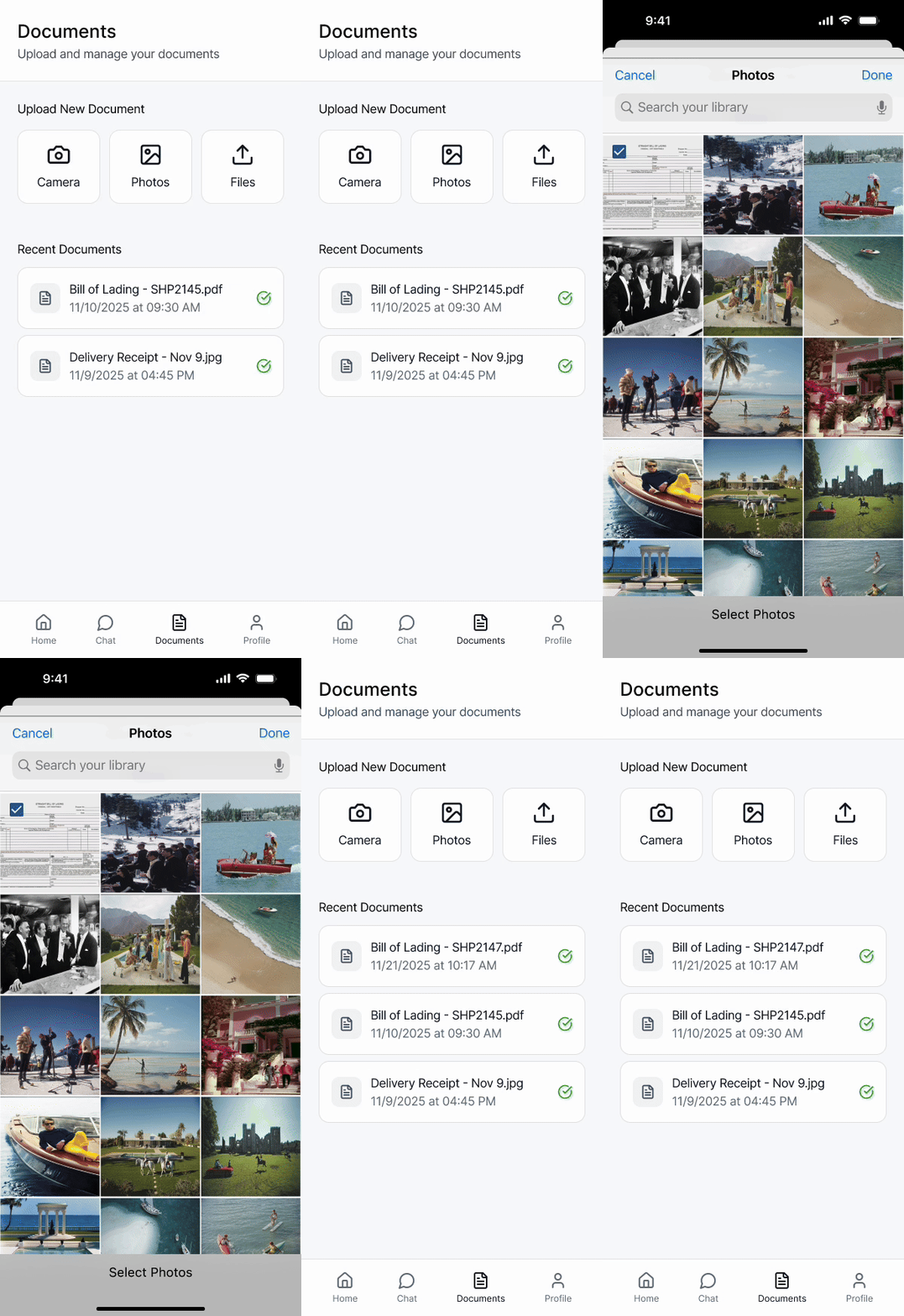
Documents: camera, photos, files. The same document workflows were preserved across navigation models to maintain consistency and reduce relearning.
Bringing It All Together
The final solution brings together voice, chat, navigation, and document access into a single, cohesive enterprise AI experience. Role-aware behavior ensures that users see only what is relevant to their responsibilities, reducing ambiguity and supporting predictable interaction.
Multiple input modes allow the assistant to adapt to different environments and task types without fragmenting the experience. Together, these elements establish a scalable foundation for an AI assistant designed to evolve within complex, permission-based organizations.
VALUE
Impact
A Strategic Blueprint for Enterprise AI
While this project was a conceptual exploration, its primary value was in de-risking how an enterprise AI assistant could be introduced responsibly. The work reframed the problem from “what the technology can do” to how an assistant can be designed to remain usable, safe, and trustworthy within high-security, permission-based environments.
One key outcome of this exploration was demonstrating that role awareness is a UX strategy, not just a technical requirement. By designing role-aware behavior from the start, the work illustrates how AI can reduce noise rather than add to it—ensuring users only encounter information and actions aligned with their responsibilities. This turns access control into a usability advantage rather than a constraint.
The project also addresses a common risk with AI adoption: product fragmentation. By exploring how voice and chat interactions coexist with structured navigation, the work shows a path for integrating AI into existing workflows without making it feel like a disconnected or “bolt-on” feature. Conversational AI becomes part of the system, not a parallel experience.
Ultimately, this exploration provides a framework for evaluating AI readiness at the experience level. It surfaces risks early, clarifies boundaries, and establishes a shared design language for how AI can support users without undermining trust or operational clarity.
When clarity, trust, and thoughtful boundaries align, AI becomes a dependable tool rather than a source of risk.
REFLECTION
Lessons Learned
Designing an enterprise AI assistant reinforced that AI experience design is less about intelligence and more about boundaries. Without clear role awareness and visible structure, even the most capable AI can introduce risk, confusion, or mistrust. Establishing guardrails early proved essential to making the experience feel dependable rather than unpredictable.
This work also highlighted that conversation alone does not scale. While voice and chat lower the barrier to entry, users still rely on spatial cues and predictable navigation when tasks become routine. As the system expanded beyond exploratory interaction, structured navigation became necessary to support efficiency and reduce cognitive load.
Another key lesson was that voice-first design improves clarity across all modalities. Designing for spoken interaction forced responses to be concise, intentional, and interruptible—benefits that carried over into text-based experiences and improved overall usability.
Finally, this project emphasized the importance of design-led exploration early in emerging technologies. By visualizing constraints, tradeoffs, and system behavior before implementation, design can surface risks sooner and help organizations approach AI adoption with greater confidence and responsibility.
FINAL THOUGHT
My Design Philosophy
This project reflects my belief that strong AI experiences are grounded in clarity, restraint, and respect for context. In enterprise environments, success is not measured by how much an assistant can do but by how reliably it supports users within clearly defined boundaries.
I approach AI design as a systems problem before it becomes an interface problem. Voice, chat, navigation, and access control must work together to create an experience that feels predictable and trustworthy, especially when users are interacting with sensitive or operational information.

Rather than treating AI as a replacement for existing workflows, I focus on integrating it in ways that reinforce established mental models. When AI aligns with how people already work, adoption becomes a natural outcome rather than a forced change.
Ultimately, my goal is to design AI experiences that earn trust over time—by being useful, transparent, and intentionally limited. That philosophy guided every decision in this exploration and continues to shape how I approach complex, enterprise-scale problems.